5×
faster feel
In day-to-day use the new transcription path feels up to five times faster than the earlier setup.
Hold your middle mouse button, speak in your own language, and release. WhispererDot listens, transcribes with OpenAI speech models, can instantly translate (e.g. German → English), sends it through generative AI, and types the result directly into any input field in your browser.
Currently supports macOS + Chrome/Brave and assumes you know how to plug in your own OpenAI token.
Fresh update
WhispererDot now supports three OpenAI transcription models: whisper-1, gpt-4o-transcribe, and
gpt-4o-mini-transcribe. The new default is GPT-4o Mini Transcribe, which in real-world use feels dramatically
snappier and gives you a cheaper baseline for daily dictation.
In day-to-day use the new transcription path feels up to five times faster than the earlier setup.
Switch between Whisper-1, GPT-4o Transcribe, and GPT-4o Mini Transcribe right in the extension settings.
Optional silence detection is now built in, but disabled by default so manual control stays untouched until you want it.
Compared with whisper-1, gpt-4o-mini-transcribe roughly halves transcription cost at current OpenAI pricing.
Live demo
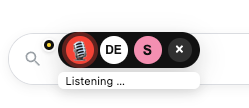
This is the experience: middle-click, speak in your own language, let WhispererDot translate and drop polished text exactly where you need it. Watch the overlay pop up, the translation toggle flip, and the result appear instantly in the input field.
The video is captured right from macOS Brave – no edits, no mockups. This is what you get when you install the extension and native helper with your own OpenAI key.
WhispererDot is a browser extension that gives you voice-driven generative AI anywhere you can type. Middle-click in any text field, speak naturally, and WhispererDot converts your speech into structured AI output: emails, tickets, docs, GitHub issues, answers, or even code.
Instead of juggling tabs, copy-paste, or separate prompt windows, you talk once and the text appears right where you need it. Your flow stays in the browser tab you’re in: Jira, Gmail, Notion, GitHub, ChatGPT – anywhere.
You don’t have to think like a prompt engineer to get value out of it either. WhispererDot is built so you can just talk like a human, in your own language, and let the system do the prompt engineering, translation, and formatting behind the scenes.
A lightweight native host and the WhispererDot browser extension listen for your middle-click in focused text fields. While you hold the button, WhispererDot records audio, transcribes it via Whisper, wraps it in a smart prompt, and calls your preferred LLM.
The generated text is written straight into the input field you clicked on.
WhispererDot eliminates the gap between “I know what I want to say” and “it’s written down – perfectly”. You stay in flow, speak your intent, and let AI handle the typing, formatting, and boilerplate.
Whether you’re a developer, founder, support agent or writer, it feels like adding a tiny assistant into your mouse: one that understands your language, your shortcuts, and your favourite tools.
Use the middle mouse button in any browser input field to start voice-to-AI instantly.
Dictate bug reports, commit messages, emails, or even code; WhispererDot and your model do the typing.
Leverages Whisper-style speech recognition for fast, accurate transcripts as the base for AI.
Speak in your native language and let WhispererDot translate it for you – for example, dictate in German, flip the language switch to EN, and export the final result in English.
Point WhispererDot at your preferred AI backend and prompt presets – you stay in control of outputs and cost.
This is the “no shit, that’s cool” feature. You speak in your native language – for example German – and with a simple language switch WhispererDot turns your words into fluent English you can drop into emails, tickets, docs, or code comments.
You stay in your language. WhispererDot handles the translation and AI polish, then types the English result directly into whatever input field you were using.

Works everywhere
WhispererDot hooks into any input field that your browser exposes, so even “exotic” apps like web.telegram get a native-feeling voice-to-AI upgrade. Middle-click, talk in your usual language, and watch the message box fill up without needing bots, slash commands, or weird integrations.
Need to message an English-speaking business partner? Keep speaking in your native language, flick the English output toggle, and WhispererDot types a flawless Telegram message for you. No more noisy voice memos or typo-heavy texts—just clean, translated prose ready to send.

Google AI Studio + Whisper
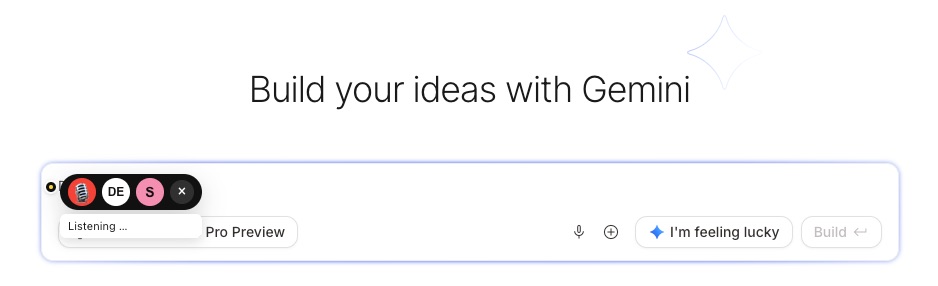
Google AI Studio is fantastic for assembling Gemini-powered app logic, but its built-in voice capture can’t keep up with Whisper-level accuracy. WhispererDot fixes that gap: the AI Enablement + AI Integration Brave extension lets you dictate whole rows of requirements, prompts, or copy, then pass the clean transcript straight into Gemini.
The same flow we show with Telegram on this page now lives inside AI Studio and our site: hold the trigger, speak in your native language, and WhispererDot streams the best-in-class speech recognition output into Google’s UI so you can assemble generative AI apps without touching the keyboard.
You’re effectively pairing the market leader in language recognition (Whisper) with the market leader for building generative AI applications (Gemini in Google AI Studio) – a super combo that makes shipping voice-dictated AI products feel instant.
Why Whisper?
Whisper is the foundation that makes WhispererDot possible. It’s OpenAI’s open speech-recognition model trained on hundreds of thousands of hours of multilingual audio. Instead of brittle command-style systems, it uses a massive transformer to understand natural speech in many languages, detect accents, and auto-translate when you need it.
Long story short: you benefit from world-class research without building your own speech stack – we just point WhispererDot at Whisper and everything downstream gets higher quality input.
Encrypted HTTPS to OpenAI
Multilingual transformer brain
Context-aware translation
Runs in the same infra that powers ChatGPT voice.
WhispererDot leans on OpenAI’s Whisper stack because it’s built like serious infrastructure, not a toy dictation widget. Audio is streamed over HTTPS straight to OpenAI’s encrypted endpoints, processed inside hardened data centers, and returned as text over the same secure channel. Nothing is stored inside the extension – once the transcription lands, the audio buffer is discarded.
Whisper itself is trained on massive multilingual corpora, so your translation isn’t a literal word swap: the model understands context, tone, and domain-specific phrasing before handing back the text that flows into your LLM.

The result: enterprise-grade voice capture with accurate translation that you can trust inside regulated workflows.
WhispererDot comes with a couple of professional “in-the-weeds” controls. Click the toolbar icon to trigger recording immediately, or use the floating dot in each input. Prefer shortcuts? Map any key combo – even your middle mouse button with tools like Keyboard Maestro or BetterTouchTool – and fire dictation without touching the UI.

Tap the WhispererDot icon in your browser toolbar and recording starts instantly. The icon badge flips to “REC” so you know it’s listening, and you can still use the dot inside inputs if you prefer.
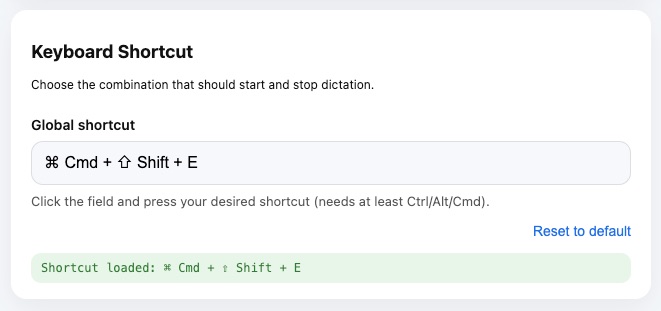
Assign a global shortcut right in WhispererDot or bridge your middle mouse button via Keyboard Maestro / BetterTouchTool / custom scripts. Hold that trigger, talk, and WhispererDot handles the rest.
WhispererDot is built for people who think faster than they can type. It keeps you in the tools you already use, but removes the slow part – turning half-formed ideas into clean, structured text.
Dictate commit messages, PR descriptions, GitHub issues, or “explain this code” prompts while your hands stay on the keyboard. WhispererDot can translate from your native language, tighten up the wording, and post it straight into your dev tools.
Talk through what the customer is struggling with and let WhispererDot draft a clear, empathetic reply in English. Use your own language to think and reason, then send polished responses that match your team’s tone of voice.
Brain-dump product ideas, meeting notes or rough outlines into any text field. WhispererDot turns the ramble into structured specs, summaries, or first-draft copy that you can tweak instead of writing from scratch.
WhispererDot isn’t a generic dictation toy. It’s for people who already live in their terminal, IDE, or browser dev tools, and want to move even faster: software engineers, cloud/SRE/DevOps folks, systems engineers, power users who tweak everything, and founders who ship their own product.
If you’re comfortable juggling tabs, APIs, and automation, WhispererDot fits right in. If you’d rather have IT set it up for you, this probably isn’t your tool (yet).
It also assumes you can control your environment. WhispererDot is engineered for focused makers working from a studio, home office, or any setup where talking to your computer is natural — not for open-plan floors where seventeen colleagues share the same desk pod. If you thrive in a quiet space, work remotely, and invest in good microphones and fast workflows, you’re exactly who we built it for.
In short: if you build or operate software and know how to grab an API token, WhispererDot is for you.
Under the hood, WhispererDot is a small set of sharp, opinionated features designed to kill busywork: speak once, get clean output, and keep your hands free for the parts that actually need your brain.
Hold the middle mouse button in any input field to start recording instantly. No extra windows, widgets, or overlays – just click, talk, release.
Speak in your native language – for example German – and let WhispererDot translate and polish the result into clear English that’s ready to send.
Switch between “native language in, same language out” and German → English translation from the floating menu so you always dictate in whatever language feels natural.
Jira, Gmail, Notion, GitHub, helpdesk, your internal admin UI – if it has a text box in the browser, WhispererDot can type into it.
A lightweight native host handles audio locally, sends just what’s needed to your models, and keeps the whole flow feeling instant.
Use your own OpenAI API key from the macOS Keychain and wire WhispererDot into the models and prompts that fit your workflow and budget.
On the web you see this walkie-talkie feature from chatgpt.com every day: press the mic, talk, and a few seconds later perfectly readable text appears in the window. Not the usual clunky word-by-word transcription the other tools spit out, but true speech recognition — fast, clean, stable.
There’s just one catch: you only get that quality on chatgpt.com.
Everywhere else online — comments, forms, support tickets, email, admin interfaces — you’re stuck typing the old-fashioned way. So it was obvious: we needed a way to bring this high-end speech recognition to any input field across the entire internet. One button → mic opens → you talk → the text lands right where your cursor is. Done.
Sure, there was a Chrome extension that tried to do something similar, but of course it was 19 €/month, bloated UI, endless options. When the trial ended, the UI just faded to black. So we said: If the world won’t hand us a good tool, we’ll build it ourselves.
Not the old-school way either — we’re doing it 2025 style.
The software? WhispererDot – VoiceToEverywhere.
WhispererDot is built out of a simple frustration: we think in paragraphs, but keyboards make us type in slow motion. With WhispererDot, “coding”, “writing” and “explaining” become something you say – not something you grind out character by character.
WhispererDot itself is just the tool. The only ongoing cost comes from your OpenAI usage – mainly the speech-to-text transcription API and the language model you plug in. The punchline: voice feels like a superpower, but the bill usually looks like loose change.
As of today, whisper-1 is billed at about 0.006 USD per minute, while
gpt-4o-mini-transcribe sits at about 0.003 USD per minute,
and the text model is billed per 1,000 tokens – a few cents for hundreds of messages. Light or heavy use,
you only pay for what you actually dictate.
You add your own API key in the macOS Keychain, so you keep full control. If pricing changes, WhispererDot automatically follows whatever your OpenAI account charges.
Say you go hard and dictate around 2 hours every workday – that’s roughly 50 hours per month. With current OpenAI pricing, the math looks like:
whisper-1: 50 hours × 60 minutes × 0.006 USD ≈ 18 USDgpt-4o-mini-transcribe: 50 hours × 60 minutes × 0.003 USD ≈ 9 USDIn other words: the new default can save roughly 9 USD per month on heavy dictation by itself, before token costs.
Switching the default from whisper-1 to gpt-4o-mini-transcribe means you get a lower-cost baseline
without giving up the clean WhispererDot workflow. You can still switch back anytime if you want.
That makes the tradeoff simple: keep the speed, keep the voice workflow, and trim transcription spend by about half on the default path.
Stop pecking at a keyboard and start talking. WhispererDot turns minutes of typing into seconds of speaking, so you can get back to building, shipping, and thinking instead of hunting for the right keys.
Draft the same email, ticket, or spec in a fraction of the time by speaking once instead of hammering it out by hand.
Replace daily “writing chores” – status updates, summaries, replies – with a few minutes of voice and instant AI output.
Speak in your own language, get polished English in the same input field, and never bounce between tools or tabs.